Introduction
We’ve all been there: dragging a confidential PDF to the recycle bin and hearing that satisfying digital “crunch.” It feels permanent, final, secure. But here’s the unsettling truth—that sense of security is an illusion. That simple click doesn’t vaporize data; it merely hides the signposts pointing to it. The actual 1s and 0s linger like invisible ink on your drive, leaving behind ghostly fragments of your personal and corporate life. For anyone armed with freely available recovery software, resurrecting your “deleted” tax returns, family photos, or business strategies is not a magic trick—it’s a trivial technical exercise.
What Is Data Destruction?
Data destruction transcends the simple act of making a file temporarily vanish from your graphical user interface. A professional service doesn’t just hide the roadmap to your information; it fundamentally obliterates the underlying data pattern at a binary level, or physically destroys the storage medium itself.
Think of it less as tidying up a digital filing cabinet and more as razing the entire building to the ground. It’s a certified, auditable process that transforms sensitive information into an unrecoverable state, ensuring that a physical hard drive or solid-state chip can no longer tell its secrets, regardless of forensic interrogation. It’s the ultimate digital dead-end.
Find more information about our data destruction service.
Why Factory Resets and Standard Deletions Fail
The Index vs. The File
Think of your hard drive like a book’s table of contents. When you hit “delete” or empty the recycle bin, you are only tearing out the entry in the index, not burning the actual pages. The binary 1s and 0s containing your photos or tax documents stay written on the drive’s magnetic platters or flash memory. They sit there completely intact until brand-new data eventually overwrites them, which can take months—or never happen at all.
The Hidden Residuals
A factory reset often feels like a digital baptism, washing away all sins and software. But from SSDs to smartphones, this is dangerously misleading. These processes typically only overwrite the visible, active logical sectors, leaving “unallocated” space completely ignored. Wear-leveling technology in modern drives further complicates this by scattering data remnants across hidden over-provisioned blocks that standard resets can’t even access. The result? A resold device might look clean on the surface but harbor ghostly territories of cached passwords, encryption keys, and app data waiting to be mined.
Are you worried about e-waste? Click here to learn more about the tech recovery process.
The 3 Methods of True Professional Data Destruction
There are three distinct, certified methods for data destruction. Each offers a different balance of security, speed, and visual verification, but they all share a common goal: slamming the door shut on the data ghosts haunting your retired devices.
Here’s how true pros permanently silence your digital history.
Degaussing (Magnetic Elimination)
Degaussing functions as a process where the magnetic storage device, be it a hard disk, a tape backup or even a floppy disk, goes through a special machine producing a strong burst of magnetism. The moment that the device receives such an electromagnetic pulse, all the magnetic domains get scrambled and wiped off in just a few seconds.
Because hard disk degaussing fundamentally disrupts the underlying magnetic structure, it works equally well on both functional drives and completely dead hardware. This method, specifically hard disk degaussing, is one of the cleanest, fastest ways to render traditional magnetic media entirely unreadable.
Click here to learn more about degaussing’s benefits.
Crushing (Physical Circuit Disruption)
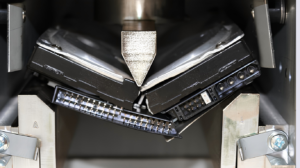
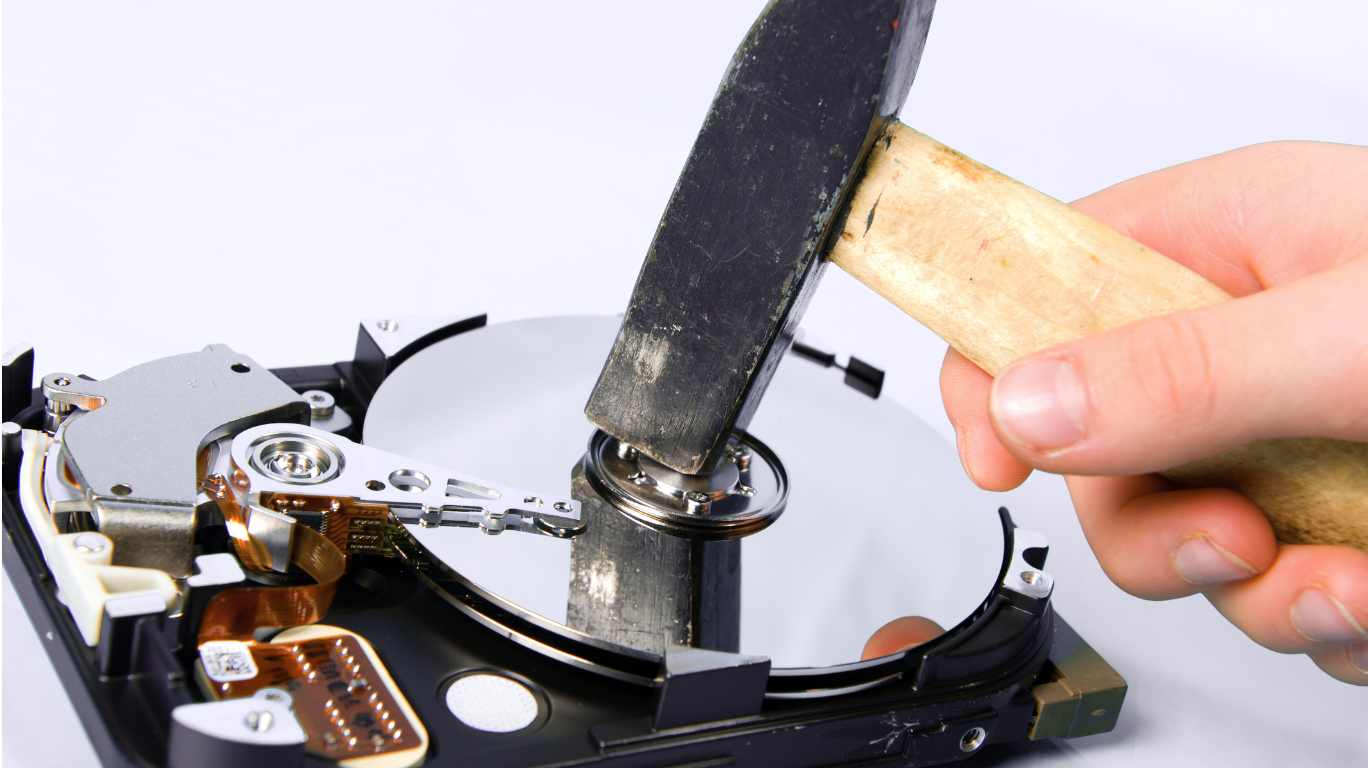
Sometimes, brute force is the most eloquent solution. A heavy-duty hydraulic press takes the entire hard drive assembly and physically bends it into a sharp, unforgiving “V” shape. This action breaks the perfectly balanced magnetic platter and shatters the delicate internal circuitry into fragments. It’s the go-to method for drives that are password-locked, mechanically failed, or too damaged for a software wipe. Highly fast and cost-effective, crushing delivers a visceral, immediately verifiable destruction that guarantees the read-write heads will never find their data markers again.
Click here to learn more about crushing’s benefits.
Shredding (Complete Micro-Particle Pulverization)
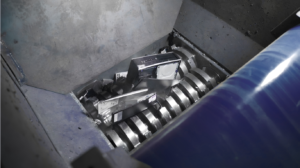
For the ultimate expression of zero-trust security, nothing beats industrial shredding. Forget office paper shredders; these are heavy industrial grinders that chew through the device’s composite metal, plastic, and silicon like a hungry dinosaur. The process reduces the entire physical drive into unrecognizable, coin-sized particles—or even smaller fragments. This isn’t just breaking a device; it’s a complete micro-particle pulverization that guarantees zero data leakage. When your sensitive data carries existential corporate risk or sovereign-grade secrecy, reducing the hardware to confetti is the only peace of mind.
Click here to learn more about shredding’s benefits.
Choosing the Right Security Protocol: Onsite vs. Offsite
Deciding between onsite and offsite destruction isn’t just a logistical preference; it’s a foundational security decision that defines your chain-of-custody. Making the right call requires a clear-eyed evaluation of your internal compliance mandates and your psychological need for visual closure.
Step 1: Chain-of-Custody Evaluation
Begin by dusting off your internal security compliance policies. Do they mandate an unbroken, verifiable visual chain-of-custody from the moment data is retired to the moment it’s destroyed? For regulated industries like finance or legal practices common in Singapore’s CBD, assets often cannot legally leave the office layout without a witnessed audit trail. Understanding this threshold determines whether you need your own eyes on the process or can trust a secured pipeline.
Step 2: Select Onsite Verification
If your answer to Step 1 is a resounding “yes,” onsite destruction is your protocol. Opt for mobile degaussing or a truck-mounted crushing service that rolls directly to your corporate doorstep. This allows your company stakeholders—from IT managers to compliance officers—to physically witness, log, and verify the destruction of media while it remains securely within your premises. There’s a profound peace of mind in watching a drive fold into a silent “V” with your own eyes, right in your own loading bay.
Step 3: Select Secure Offsite Processing
If an onsite setup isn’t strictly required by your policy, secure offsite processing offers a highly efficient alternative. This involves arranging for a verified provider to conduct an enclosed, tamper-proof transport of your locked hardware directly to their specialized facility. Reputable vendors use GPS-tracked vehicles and provide detailed documentation matching the serial numbers received to the particles shredded. It’s a rigorous, hands-off solution that transfers the physical security burden to a purpose-built industrial environment while maintaining full auditable accountability.
Conclusion
Keeping old hard drives in a storeroom or casually tossing them into the e-waste pile isn’t spring cleaning, it’s an active security vulnerability waiting to be exploited. True peace of mind demands moving beyond the illusion of the recycle bin. For data that truly matters, only verifiable, high-level physical destruction turns your digital ghosts into dust, permanently.
Learn here how to protect your personal information during device transfer.