
Introduction
When you’re ready to sell or trade in your game console, the remaining warranty is a good bargaining factor that many sellers overlook. A console still under cover can get significantly higher offers, but cautious buyers won’t take your word for it. The problem? Most of us never bother to check warranty status or gather proof, leaving easy money on the table. Here’s a quick, step-by-step guide to locating your game console serial number gathering the necessary documents and using the official warranty tracker to confirm active coverage—ensuring you get the full value your console deserves.
Variables Influencing Warranty Validation
When proving your console’s coverage to a savvy Singaporean buyer, remember that warranty validation hinges on three critical variables across all major platforms:
- Country of Purchase: Whether you own a PlayStation, Xbox, or Nintendo Switch, manufacturers enforce strict regional warranty policies. A console imported from overseas may lack local coverage, meaning these cross-border limitations will heavily impact its local resale value.
- Proof of Purchase: Cautious buyers and trade-in platforms require hard evidence. Keeping your physical invoices or digital receipts is critical for official validation to prove exactly when and where the device was bought.
- Activation Date: Your initial setup tracking determines the true expiration window, protecting you from losing valuable coverage time based purely on the older manufacturing timeline.
Pre-Check Checklist (Before You Click)
Before using any official tracking sites, make sure to do these two quick checks:
Locate the Serial Number
Start by checking the console directly:
- The PlayStation 5 will have its serial number on the bottom of the console baseplate.
- The Xbox will have its serial number on the back cover of the Xbox.
- The Nintendo Switch will have its serial number located on the kickstand.
Note: If the sticker is damaged or faded, don’t worry too much; you should still be able to locate it in System Settings > About > General on your console.
Documentation Prep
Store all of your potential proof of purchase in one folder – you should have a copy of your original order confirmation email or receipt and/or a picture of your physical receipts ready to show to potential buyers.
The Complete Brand-by-Brand Directory
Nintendo Warranty
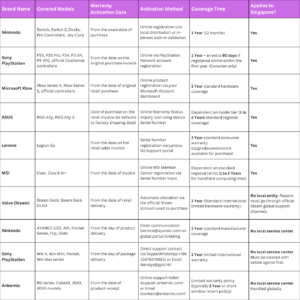
Convergent Systems operates the official service center for Singapore, offering a local one-year warranty on Nintendo Switch hardware and official accessories like Joy-Cons. To secure the Nintendo warranty, buyers must carry in the device along with their physical or digital purchase receipt, as parallel imports from overseas are strictly excluded from local repair.
Sony PlayStation Warranty
There is a one-year minimum warranty on all PlayStation consoles purchased in Singapore, which begins from the purchase date or the date on your invoice. If you register your serial number online within the first year after purchase, you will also get an additional 90 days warranty. Parallel imports’ warranties cannot be honored; the original purchase invoice must be “validated” when presented at a location service center for warranty repair.
Learn more about your PS5 resale value in Singapore
Microsoft Xbox console warranty

To confirm your Xbox console warranty, log into your official Microsoft account and register the console using its serial number. The portal calculates your exact remaining timeline, giving you a shareable status screen. Ensure your original Singapore retail invoice matches this window to offer buyers verifiable proof of active local coverage.
ASUS ROG
For the ROG Ally or gaming laptops, ASUS provides an online Warranty Status Inquiry portal. Inputting the product’s serial number immediately reveals the exact coverage expiration date. Because second-hand buyers value this transparency, keeping a screenshot of this status alongside your original authorized Singapore invoice drastically boosts resale trust.
Lenovo
The process of checking the Lenovo Legion Go gaming handheld is flawless using the Singapore support portal. Simply enter the serial number of your device in the online warranty checker and the full details of your current entitlement and expiration date will POP up immediately. The official results provide a proven way for potential customers to prove that they have access to active local support.
MSI
To verify the warranty on your MSI Claw or gaming handheld, log into the MSI Member Center portal. Entering the serial number directly allows you to check active coverage timelines. Keeping your authorized Singapore retail invoice is vital, as MSI requires it to validate local warranty claims.
Valve
Valve ties the one-year warranty for Steam Deck hardware to the unique serial number for the Steam Deck, so the coverage automatically transfers to a second buyer. Sellers can instruct second buyers to check with Steam support to validate the history of registration for the hardware. Providing the original Steam Purchase Receipt will ensure that it is seamless to validate the hardware.
AYANEO
Checking your AYANEO handheld’s coverage is straightforward via the official AYANEO Support page. Their global after-sales policy outlines your hardware eligibility based on the original invoice date. Because these are premium enthusiast devices, having your digital purchase receipt ready dramatically boosts buyer confidence in Singapore’s marketplace.
AOKZOE
To verify an AOKZOE gaming handheld’s coverage, sellers must contact their global customer support team or submit an official inquiry ticket. Because these devices are primarily sourced online, providing buyers with your original crowdfunding confirmation or digital store invoice serves as the definitive proof required for future warranty claims.
GPD
GPD handles hardware support directly through its centralized service and digital inquiry portal. To confirm your remaining warranty timeline, cross-reference your serial number by reaching out to their official service team online. Presenting your original e-commerce receipt ensures the secondary buyer can access future technical assistance.
Anbernic
Anbernic manages after-sales support and warranty queries directly via its dedicated contact channels and online ticket system. Because retro handhelds frequently change hands, keeping your original e-commerce receipt or invoice is essential to help the new owner validate the device’s purchase date for any future troubleshooting.
Leveraging Active Warranties to Maximize Profit
An active warranty functions as a powerful tool to offset buyer hesitation in Singapore’s second-hand market. By eliminating the risk premium—the discount buyers demand to cover potential hardware failures—you can confidently unlock a significantly higher asking price. When closing the deal, focus on a clean transfer.
Safely hand over physical receipts and digital PDFs without violating vendor terms of service, ensuring the new owner enjoys seamless protection while your personal account credentials remain entirely secure.
Quick Recap
Final Words
Before you snap photos and draft your listing for SellUp or local trade-in shops, take ten minutes to officially secure your console’s warranty status. Gathering your retail receipts and pulling up official portal read-outs takes minimal effort but delivers massive returns. Verifiable coverage transforms your listing from just another used device into a premium, risk-free purchase. Prove your coverage upfront, protect your asking price, and ensure a smooth, profitable sale that leaves no money on the table.
Ready to resale your devices? Check here how to find out if your device has been refurbished before (affects value)