Your phone’s battery health plays a bigger role in its resale value than most people realise. When you’re looking to sell your iPhone for the best price or trade in your Android device, even a small difference in battery percentage can change your offer by $20–S$100.
Platforms like SellUp make this process transparent — giving you an instant quote, access to verified dealers, and same-day cash payment. But understanding why battery condition matters helps you get a fair deal and avoid common misconceptions.
1. Why Battery Health Matters in a Trade-In
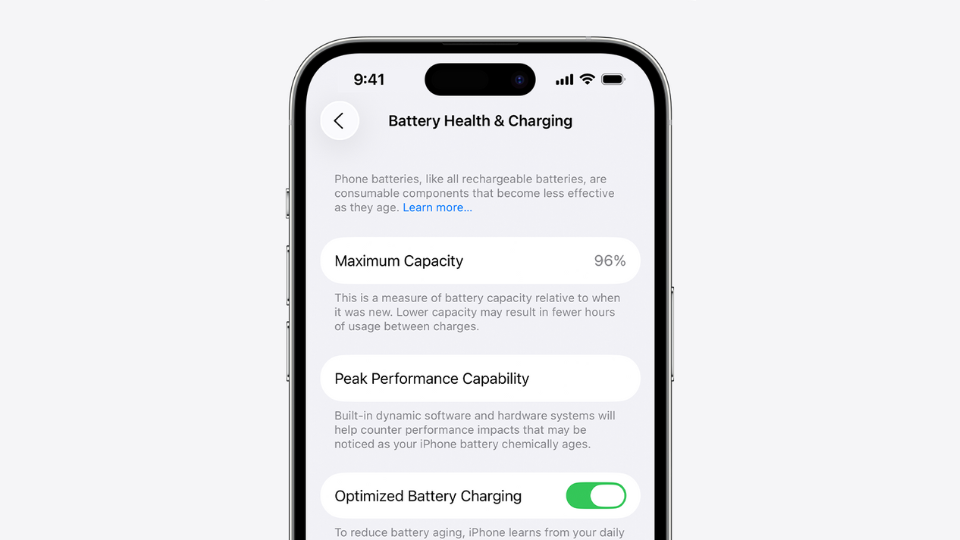
Battery health reflects how much capacity your phone’s battery can still hold compared to when it was new. A lower percentage means shorter battery life and a higher likelihood that the buyer will need a replacement soon.
From a resale perspective, it’s not just about convenience — it’s about cost. Dealers factor in the expense of replacing the battery before reselling your device.
Fact: At SellUp’s partner network, a drop from 90% to 85% battery health can reduce a quote by S$40–S$80, depending on model and market value.
2. How to Check Battery Health Before a Trade-In
Typical Battery Health Range for Top Value
|
Battery Health |
Trade-In Grade |
What It Means |
|
91% – 100% |
Excellent |
Full resale value, qualifies for “Like New” or “Excellent” condition. |
|
86% – 90% |
Good |
Slight wear, still normal for devices over a year old. |
|
80% – 85% |
Fair |
Minor deduction (S$40–S$80). Recommended to sell soon. |
|
Below 80% |
Replace Recommended |
Usually triggers “Service” warning and larger deductions. |
Pro tip: Always check your battery health a few days before getting a quote. If it’s just below 90%, trade in sooner — waiting longer may drop it further.
Average Deductions by Model Tier
|
Model Type |
Price Range (SGD) |
Typical Deduction |
|
High-end (S$1,000+) |
iPhone 15 Pro Max, Galaxy S24 Ultra |
S$50 – S$100 |
|
Mid-tier (S$500 – S$1,000) |
iPhone 13 / Galaxy A Series |
S$40 – S$80 |
|
Entry-level (< S$500) |
Budget Androids |
S$20 – S$70 |
SellUp’s quote engine automatically adjusts this deduction transparently across verified dealers.
3. Common Misconceptions About Battery Grading
1. “Battery health below 90% means my phone is bad.”
This is not true. A health level of 85–89% is still normal wear for a phone over one year old.
Apple considers anything above 80% within the acceptable range. Battery health only starts affecting performance when it drops below 80% or shows “Service” in Settings (Source: Apple Support).
2. “Dealers downgrade my price unfairly because of battery health.”
Battery condition directly affects refurbishment cost, not fairness.
A phone with 82% battery health may cost S$60–S$100 more to replace with a new one, so dealers adjust accordingly. It’s not a penalty — just a transparent value offset.
3. “Replacing the battery before selling guarantees a higher quote.”
Not always.
- If done at an authorised service centre (Apple or Samsung), it can increase your quote slightly.
- If done at unauthorised repair shops, dealers will classify it as “non-original parts”, reducing value due to warranty and safety concerns.
- If you decide to replace the original battery, it may cost more than the value you gain from a higher quote. It’s best to check the repair price before making a decision —
Check the estimated cost here: https://sellup.com.sg/repair.php
Only replace if you’re certain the new battery is genuine and properly documented.
4. “Battery health equals performance or lifespan.”
Battery health measures capacity, not speed or life expectancy.
An 85% battery still powers your phone at full performance; it simply holds slightly less charge. Dealers don’t penalise normal ageing — only functional issues.
5. “The percentage shown in Settings is 100% accurate.”
Not necessarily.
Battery readings can fluctuate after software updates, resets, or replacements.
Most professional dealers (including SellUp’s network) use hardware-level diagnostics that measure charging cycles and voltage directly — not just the Settings percentage.
4. Recommended Battery Health Tools
Before trading in, check your battery condition using official tools:
- Apple iPhone: Apple Support Battery Health Guide
- Samsung Galaxy: Samsung Battery Care & Diagnostics
- Other Android: Tom’s Guide — How to Check Android Battery Health

5. Battery Health and Your Trade-In Value
Battery wear is a normal part of owning a phone, but it does influence what you receive at trade-in. While you can’t restore lost capacity, you can slow further decline by avoiding heat, using original chargers, and keeping overnight charging to a minimum. If your device displays a ‘Service’ warning, it can still be traded in, which usually results in a deduction of about S$80–S$120, depending on the model. All trade-in platforms account for battery condition, though not all show these adjustments upfront.
6. Final Takeaways
Battery health may look like a small number on your settings screen, but it carries real weight when it comes to trade-in value. Whether your device sits at 95% or 85%, understanding what that figure actually signals helps you decide the right moment to sell — and how much you can realistically expect to receive. For many users, that knowledge alone can mean the difference between a fair offer and an unnecessary deduction.
If you’re planning to upgrade, start with clarity. SellUp makes it easy to understand your battery’s impact, compare real offers, and walk away with a stronger payout.