Introduction
The voice assistant you have relied on for years is officially preparing to step aside. Google has set a deadline for Google Assistant’s use on smartphones, creating an opportunity for Gemini AI to take over. This marks a transition from voice commands to a more dynamic assistant powered by AI. For mobile users, it means a shift from straightforward tasks to dialogues with advanced artificial intelligence.
The Official Expiration Date & Timeline
Google officially announced that it would begin removing Google Assistant from mobile devices starting September 4, 2026. Rather than an immediate worldwide shutdown, this transition is rolling out in phases over several weeks across Android and iOS platforms.
This “expiration” involves a full phaseout of the legacy service on mobile hardware. Once updated, Google Assistant functionality will be removed, and the option to revert back to it will be disabled. Triggering your mobile assistant via voice commands or hardware buttons will automatically route requests directly to Google Gemini AI instead.
Why Google Is Replacing Assistant with Gemini
Google is replacing Assistant because the company is consolidating its AI efforts around a single platform. While Assistant was built around pre-set voice commands and a simple execution of tasks, Gemini makes use of expansive language models to comprehend natural conversations and carry out more complicated tasks.
Also, with its advanced implementation across Google applications, Search, and generative AI applications, Gemini can extract information from Gmail, Docs, Drive, and the web in ways that were previously impossible. Instead of having two similar assistants, Google is focusing on the resources spent on Gemini’s multimodal and contextual abilities as the main AI assistant.
What Happens to Google Assistant on Your Phone
Once the transition reaches your device, the changes are permanent.
- Android: saying “Hey Google” or long-pressing the power button will launch Gemini instead of Google Assistant.
- iOS: the standalone Google Assistant app is being removed, and Assistant features within the Google app will redirect to Gemini.
- Pixel devices: the power button shortcut will now summon Gemini, and lock screen access may require enabling “Use Gemini without unlocking” in the Gemini app settings. If you’re a Google loyal user read here our Google Pixel 10a review and see if you should buy it
Note: Existing routines, reminders, and settings will not transfer automatically—you will need to recreate them with Gemini.
Key Differences Between Google Assistant and Gemini AI
| Feature | Google Assistant | Google Gemini AI |
| Core Engine | Command-based Natural Language Processing (NLP) built for speed and task execution. | Large Language Models (LLMs) built for reasoning, creativity, and fluid conversation. |
| Interaction Style | Rigid voice commands and short phrases. | Context-aware, natural, conversational dialogue with follow-up support. |
| Input Capabilities | Primarily voice-driven with basic text inputs. | Multimodal (understands text, voice, images, and on-screen content simultaneously). |
| Ecosystem Integration | Basic links to core system tools and home automation. | Deep native integration with Google Workspace apps (Docs, Drive, Gmail) and Search. |
| Primary Use Cases | Setting quick alarms, brief Q&A, and basic smart home control. | Draft generation, summarizing complex documents, brainstorming, and multi-step task planning. |
What You Need to Do
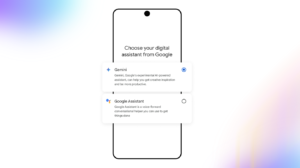
Most users will not need to switch manually—Gemini will take over automatically once Assistant access is removed. However, it is possible to get ready now.
- First, verify which of your devices will be affected—Assistant will still be available on Google smart speakers and cars.
- Then, make sure to activate Gemini as the default assistant in settings and test it with the commands you mostly use, for example, smart-home features, reminders, and navigation requests.
- Finally, check which apps Gemini is connected to and what permissions it has, given that previously, in certain cases, Assistant would do that for you automatically.
Impact on Other Devices and Ecosystems
Android mobile and tablets will be totally changed: After September 4th of 2026, Google Assistant will no longer be available and will be replaced by Gemini as the only assistant. The same transition applies to smartwatches powered by Wear OS. The new Gemini has already begun to be implemented on wearable devices running on Wear OS 4+.
However, Google Home and Nest smart speakers will be updated on a different schedule. Cars running on Google will continue to support Google Assistant as it is a built-in technology. Devices made by partners like Lenovo and Insignia were recently upgraded with Gemini, even though some integrations are incomplete.
Potential Problems and User Concerns
While the upgrade brings advanced capabilities, the transition introduces several key concerns:
- Speed and Simple Commands: Gemini’s conversational model can occasionally feel overly chatty for basic actions like toggling settings or setting quick timers.
- Offline Functionality & Hardware: Cloud-based AI functionality depends on a reliable internet connection, which raises challenges when using low-end hardware or in low-signal environments.
- Data Privacy: Generative AI depends on deeper data manipulation, making one wonder how well user data metrics, data processed through the cloud, and data collection policies are implemented.
- Usability Shift: Long-time users accustomed to predictable hands-free automation face a learning curve adapting to dynamic conversational responses.
The Future Is Google Gemini AI
The time for Google Assistant on mobile devices is coming to an end as the “Gemini” platform takes over. While this may disrupt many loyal users who rely on voice commands on their phones, it shows the company’s commitment to delivering AI-driven experiences on mobile. While some features and practices will change sooner than expected, the new platform will allow users to progressively access a number of advanced features.
Not only is Google changing, find out more about Samsung One UI 9.